Get started
Send your first email within minutes and get your app’s important messages into inboxes. Postmark officially supports seven languages and frameworks, with even more available from the community.
In a hurry? Copy the Markdown build spec below and paste it as a prompt to your coding agent — Cursor, Claude Code, Copilot — to wire up Postmark for you.
Recommended: Add the Postmark Skills skill to give your agent Postmark-specific guidance — run:
npx skills add ActiveCampaign/postmark-skills# Postmark Email Integration — Build Spec ## Objective Integrate Postmark to send transactional email from an application via an official SDK (or SMTP). Implement for the target language/framework using the API contract and reference implementations below. ## Requirements & constraints - The server API token MUST be read from the POSTMARK_SERVER_TOKEN environment variable. Never hardcode it. - Obtain the token from the Postmark dashboard: Servers -> select/create server -> API Tokens -> "Server API tokens". Account signup: https://account.postmarkapp.com/sign_up - The sender (From) address MUST belong to a verified domain or signature. - Until the account is approved, sends are only delivered to the account owner's own verified address. - The default message stream for transactional mail is "outbound". ## Install (target language only) | Language | Install | | Node.js | npm install postmark | | TypeScript | npm install postmark (type definitions ship with the package) | | Python | pip install postmark-python | | Ruby | gem install postmark | | Ruby on Rails | bundle add postmark-rails | | PHP | composer require wildbit/postmark-php | | .NET (C#) | dotnet add package Postmark | | Java (Gradle) | implementation 'com.postmarkapp:postmark:1.13.0' | Set the token in the environment: # macOS / Linux export POSTMARK_SERVER_TOKEN="your-server-api-token" # Windows (PowerShell) $env:POSTMARK_SERVER_TOKEN="your-server-api-token" ## Send API contract Construct the client from the env token, then send a single message with these fields (names vary by SDK; canonical API names shown): - From (required): verified sender address - To (required): recipient (restricted to verified addresses until account approval) - Subject (required) - TextBody or HtmlBody (at least one) - MessageStream (recommended): use "outbound" for transactional Returns a response object whose key field is MessageID — the unique id used to track delivery, bounces, and opens. ## Error contract Check the HTTP status and the ErrorCode field. ErrorCode == 0 indicates success; surface Message for diagnostics. - 200 / ErrorCode 0 -> Success - 401 / ErrorCode 10 -> Bad or missing server API token - 422 / ErrorCode 300 -> Unprocessable (e.g. invalid/unverified From address) ## Integration notes - Reuse the send call at each app event that needs mail: confirmations, password resets, payment receipts, account notifications, collaboration activity. - Use separate message streams for transactional vs. marketing mail. - Optional capabilities: templates, open/click tracking, inbound processing.
Whatever your backend language, you can use a Postmark library or send via SMTP. Here we use one of the official SDKs to talk to the Postmark API. Copy the line for your language into your terminal or package manager.
npm install postmark# Types ship with the package — no @types needed
npm install postmarkpip install postmark-pythongem install postmarkbundle add postmark-railscomposer require wildbit/postmark-phpdotnet add package Postmark// Gradle
implementation 'com.postmarkapp:postmark:1.13.0'
<!-- Maven (pom.xml) -->
<dependency>
<groupId>com.postmarkapp</groupId>
<artifactId>postmark</artifactId>
<version>1.13.0</version>
</dependency>You need a free Postmark account to send emails. Once you create one, log in and view your servers, select your first server or create a new one, then click API Tokens and copy the Server API token. The screen with your token should look something like this:
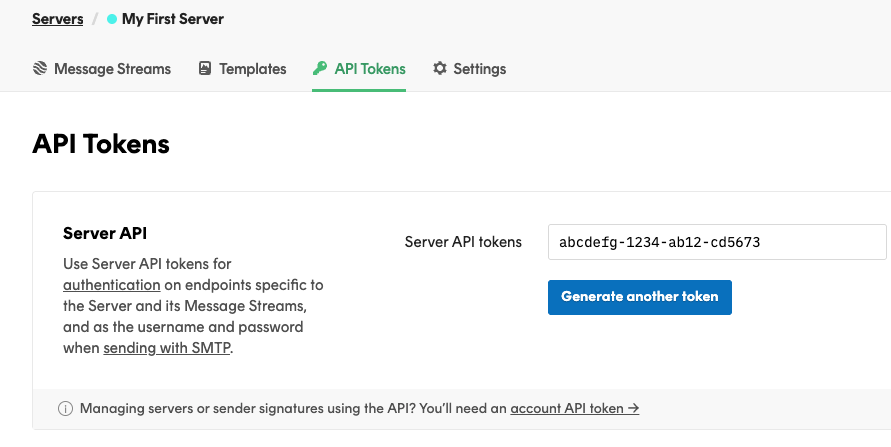
Copy that token and save it locally as an environment variable. Setting it this way keeps it out of your code — and secret, so no one else can send email using your account.
export POSTMARK_SERVER_TOKEN="your-server-api-token"$env:POSTMARK_SERVER_TOKEN="your-server-api-token"The library is installed and the token is set — all that’s left is the
API call. Replace the example address with your own Postmark account address (look for the
your email here comment), run it, and check your inbox. The email usually
arrives within seconds.
import * as postmark from "postmark";

const client = new postmark.ServerClient(process.env.POSTMARK_SERVER_TOKEN);

const result = await client.sendEmail({
  From: "sender@yourdomain.com",
  To: "recipient@example.com", // your email here
  Subject: "Hello from Postmark!",
  TextBody: "Hello dear Postmark user.",
  HtmlBody: "<strong>Hello</strong> dear Postmark user.",
  MessageStream: "outbound",
});

console.log("Message ID:", result.MessageID);
import { ServerClient } from "postmark";
const client = new ServerClient(process.env.POSTMARK_SERVER_TOKEN as string);
const result = await client.sendEmail({
From: "sender@yourdomain.com",
To: "recipient@example.com", // your email here
Subject: "Hello from Postmark!",
TextBody: "Hello dear Postmark user.",
HtmlBody: "<strong>Hello</strong> dear Postmark user.",
MessageStream: "outbound",
});
console.log("Message ID:", result.MessageID);import asyncio
import os
import postmark
async def main():
async with postmark.ServerClient(os.environ["POSTMARK_SERVER_TOKEN"]) as client:
response = await client.outbound.send({
"sender": "sender@yourdomain.com",
"to": "recipient@example.com", # your email here
"subject": "Hello from Postmark!",
"text_body": "Hello dear Postmark user.",
})
print(f"Message ID: {response.message_id}")
asyncio.run(main())require 'postmark'
client = Postmark::ApiClient.new(ENV['POSTMARK_SERVER_TOKEN'])
result = client.deliver(
from: 'sender@yourdomain.com',
to: 'recipient@example.com', # your email here
subject: 'Hello from Postmark!',
text_body: 'Hello dear Postmark user.',
html_body: '<strong>Hello</strong> dear Postmark user.',
message_stream: 'outbound'
)
puts "Message ID: #{result[:message_id]}"# config/application.rb — read the token from the environment
config.action_mailer.delivery_method = :postmark
config.action_mailer.postmark_settings = { api_token: ENV['POSTMARK_SERVER_TOKEN'] }
# app/mailers/test_mailer.rb
class TestMailer < ApplicationMailer
def hello
message.message_stream = 'outbound'
mail(
from: 'sender@yourdomain.com',
to: 'recipient@example.com', # your email here
subject: 'Hello from Postmark!',
content_type: 'text/html',
body: '<strong>Hello</strong> dear Postmark user.'
)
end
end
# Deliver it (e.g. from a Rails console)
TestMailer.hello.deliver_now<?php
require 'vendor/autoload.php';
use Postmark\PostmarkClient;
$client = new PostmarkClient(getenv('POSTMARK_SERVER_TOKEN'));
$result = $client->sendEmail(
'sender@yourdomain.com',
'recipient@example.com', // your email here
'Hello from Postmark!',
'<strong>Hello</strong> dear Postmark user.', // HtmlBody
'Hello dear Postmark user.', // TextBody
null, null, null, null, null, null, null, null, null,
'outbound' // MessageStream
);
echo 'Message ID: ' . $result['MessageID'];using System;
using PostmarkDotNet;
var client = new PostmarkClient(Environment.GetEnvironmentVariable("POSTMARK_SERVER_TOKEN"));
var message = new PostmarkMessage
{
From = "sender@yourdomain.com",
To = "recipient@example.com", // your email here
Subject = "Hello from Postmark!",
TextBody = "Hello dear Postmark user.",
HtmlBody = "<strong>Hello</strong> dear Postmark user.",
MessageStream = "outbound"
};
var result = await client.SendMessageAsync(message);
Console.WriteLine($"Message ID: {result.MessageID}");import com.postmarkapp.postmark.Postmark;
import com.postmarkapp.postmark.client.ApiClient;
import com.postmarkapp.postmark.client.data.model.message.Message;
import com.postmarkapp.postmark.client.data.model.message.MessageResponse;
ApiClient client = Postmark.getApiClient(System.getenv("POSTMARK_SERVER_TOKEN"));
Message message = new Message(
"sender@yourdomain.com",
"recipient@example.com", // your email here
"Hello from Postmark!",
"<strong>Hello</strong> dear Postmark user.", // HtmlBody
"Hello dear Postmark user.", // TextBody
"outbound" // MessageStream
);
MessageResponse response = client.deliverMessage(message);
System.out.println("Message ID: " + response.getMessageId());You won’t always be able to peek in the recipient’s inbox — so the
Postmark libraries return the detailed API response. The most useful field is
MessageID, a unique identifier you can use to track delivery, bounces, and
opens. Here are responses for common HTTP status codes (an HTTP 200 includes
an ErrorCode of 0 to indicate success):
{
  "To": "recipient@example.com",
  "SubmittedAt": "2024-11-14T12:01:05.1794748-05:00",
  "MessageID": "b7bc2f4a-e38e-4336-af7d-e6c392c2f817",
  "ErrorCode": 0,
  "Message": "OK"
}
{
"ErrorCode": 10,
"Message": "Bad or missing server API token."
}{
"ErrorCode": 300,
"Message": "Invalid 'From' address: 'sender@yourdomain.com'."
}You’ve sent a test email to yourself. Next, drop similar code everywhere your app sends email. Our templates are pre-built, editable email designs for common transactional messages — password resets, welcome emails, receipts, and more. Edit them right in Postmark, or skip them and use your own HTML instead. Either way, you send them the same way: reference a template by ID, or drop your HTML straight into the API call.
Send users a welcome email when they sign up to your product or service.
Send users a link to reset their password.
Help users reset their password if they can’t remember their email.
Help users invite others to use your product.
Notify users of new comments by other users.
Send a receipt to your customers after they made a purchase.
Request payments from your customers.
Let your users know when their trial is about to expire.
Let your users know when their trial expired.
Let your customers know about a failed payment.
Take your working code and paste it wherever you send important email. To get the most out of Postmark, you can:


